



Product Attributes on Marketplaces: Required vs Recommended on Amazon, eBay and Walmart
Product attributes are the named fields that describe an item on a marketplace listing, such as brand, size, color, material or compatibility. Marketplaces typically treat some of these fields as required, so a listing cannot go live without them, and others as recommended or optional.
Which fields fall into which group varies by marketplace, category and product type, and it changes over time. This guide explains the general model each of Amazon, eBay and Walmart uses at the time of writing, how to tell required from recommended fields, and where to check the current requirements for your own categories.
Key Takeaways
- Required vs. recommended: required attributes are generally needed before a listing can go live, while recommended attributes are optional fields that can help buyers filter, compare and find your items.
- Amazon: at the time of writing, requirements depend largely on the product type you choose for an item.
- eBay: attributes are called item specifics, and the requirements vary by category.
- Walmart: attribute requirements generally depend on the category and product type you set up an item in.
- Always verify: check the category template or attribute requirements in Amazon Seller Central, eBay Seller Hub and Walmart Seller Center before you rely on any specific field.
What Are Product Attributes?
Product attributes are the structured characteristics of a product, stored as named fields with values. Size is the field and 10 is the value; color is the field and black is the value.
In a product information management (PIM) system, each attribute is a separate field on the product record. That gives every item a consistent, structured description instead of a single block of text.

A Simple Example
A pair of hiking boots has a brand, a size, a color, an upper material, a sole type and a waterproof rating. Each of those facts is one attribute. Together, they tell a buyer what will arrive.
Tangible and Intangible Attributes
Tangible attributes describe physical traits, such as size, color, weight or material. Intangible attributes cover non-physical terms, such as a warranty period or subscription length, that still shape a buyer’s decision.
A Starter List of Common Attributes
Each category has its own relevant facts, but these groups come up on most marketplaces:
- Identity: brand, model number, manufacturer part number and a product identifier such as a UPC, EAN or GTIN.
- Physical: size, color, material, weight and item dimensions.
- Technical: capacity, power source, connectivity, compatible devices or vehicle fitment.
- Usage and care: intended use, age range, care instructions or included accessories.
- Commercial: condition, warranty, pack quantity and country of origin.
Required vs Recommended Product Attributes: What’s the Difference?
The labels differ by channel, but most marketplaces sort attributes into a few broad groups. Understanding the groups matters more than memorizing any one channel’s list, because the lists change.
Required Attributes
Required attributes are fields a marketplace generally needs before a listing can be published in a given category. If one is missing, the listing may be blocked or returned with an error.
Which fields are required depends on the channel and the category. A field that is required for apparel on one marketplace may not exist at all for tools or electronics.
Recommended Attributes
Recommended attributes are optional: a listing can usually go live without them. They add detail that buyers often use to narrow results, such as material for clothing or connectivity for electronics.
Filling them can help buyers filter, compare and find your items. It is not a guarantee of more visibility or sales, and marketplaces do not publish exactly how each field is weighted.
Conditionally Required Attributes
Some fields become required only in certain situations. A size or color field may only be mandatory when you sell in variations, and a product identifier may be needed unless the item qualifies for an exemption under that channel’s rules.
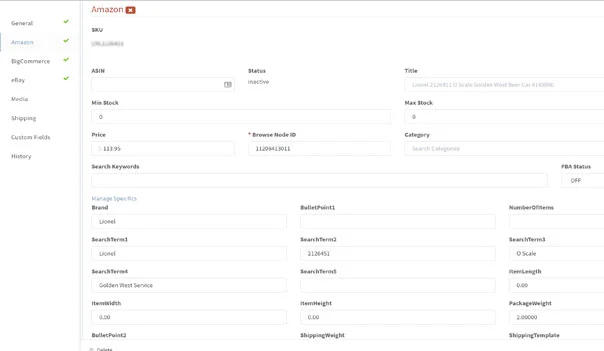
Amazon fields in a SureDone product record. Each channel has its own tab, and required fields such as Browse Node ID are marked with an asterisk.
Because each marketplace sets these rules on its own, the same item can need a field on one channel that another treats as optional. The next three sections describe each channel’s general approach at the time of writing.
Amazon: Requirements Tied to Product Type
On Amazon, attribute requirements are generally tied to the product type you choose for an item, such as a shirt, a kitchen knife or a brake pad. Different product types can have quite different required and optional fields, even within the same broad category.
A product identifier such as a UPC or EAN is commonly expected unless you have an approved exemption. Choosing the wrong product type can hide relevant fields or ask for ones that do not fit your item.
Where to Check Amazon Requirements
- The add-a-product workflow in Amazon Seller Central, which marks the fields it needs.
- The category listing template for your product type, if you upload in bulk.
- Amazon’s Seller Central help pages on product types and listing requirements.
eBay: Item Specifics by Category
On eBay, product attributes are called item specifics, and the set you see depends on the listing category. At the time of writing, the listing form groups them so you can tell which ones eBay needs and which ones it suggests.
Many item specifics accept free text, but eBay often offers suggested values. Using a suggested value where one fits may improve how well buyers can filter and find the item, compared with a custom spelling.
eBay updates item specifics requirements in some categories from time to time, so a listing template that worked before may need new values later. In eBay Motors parts categories, parts compatibility by Year, Make and Model adds another layer of structured data.
Where to Check eBay Requirements
- The item specifics section of the listing form in eBay Seller Hub, for the exact category you list in.
- eBay’s seller help pages on item specifics and on parts compatibility for eBay Motors.
Walmart: Attributes by Category and Product Type
Walmart Marketplace generally organizes attributes by category and product type. When you set up items in Walmart Seller Center, one at a time or through a bulk item setup template, the fields shown depend on the category you select.
A product identifier such as a GTIN or UPC is commonly part of what Walmart asks for. Many attributes, such as size, color or capacity, can also feed the filters shoppers use, so an empty field may mean an item does not appear when a shopper narrows results by that value.
Where to Check Walmart Requirements
- The item setup flow and current category templates in Walmart Seller Center.
- Walmart Marketplace Learn, Walmart’s seller documentation, for item setup and attribute guidance.
Why Recommended Attributes Still Matter
Marketplaces rely on structured data for categorization, search and filtering. Required fields get a listing published, but many of the filters and comparison views buyers use draw on optional and recommended fields.
Complete, accurate values can help in a few practical ways:
- Filtering: an item with a filled color or size field can show up when a shopper filters by it.
- Comparison: detailed specifications give buyers a clearer basis for choosing between similar items.
- Fewer surprises: clear values may reduce the chance that a buyer receives something different from what they expected.
Treat these as possible benefits, not promised outcomes. Results depend on the channel, the category, your competition and the quality of the rest of the listing.
Attributes vs Benefits in Your Listing Copy
An attribute is a fact, such as a full-grain leather upper or a 5,000 mAh battery. A benefit is what that fact means for the buyer, such as boots that hold up for several seasons.
Keep the structured value in the attribute field, because filters and comparison views read structured data. Use the title, bullet points and description to explain the benefit in plain language.
One rule keeps this honest: a benefit claim should never go further than the attribute value supports. If the water resistance field says IPX4, the description should not suggest the item can be submerged.
Best Practices for Prioritizing Attribute Work
Treat attribute data as living data, not a one-time setup task. A field that is optional today can become mandatory later, so regular reviews help you catch gaps before they block new listings.

Not every gap is equally urgent. This order can help you decide where to spend time:
- Clear the required fields first. Check each category’s current template or attribute requirements on every channel you sell on.
- Add the filter fields next. Fill the recommended fields buyers are most likely to filter on in that category, such as size, color or compatibility.
- Work by importance. Start with your best-selling items, then move through the long tail.
- Watch for changes. Review channel announcements and listing errors, since they often signal a field that has become required.
- Do not guess. Leave a field empty rather than entering a value you cannot verify.
A Note on Mapping Values Across Channels
Once you know which attributes matter, the remaining work is mapping one master value to each channel’s field names and accepted values, for example a color family on one channel and a specific shade on another. Keeping that mapping separate from the product record means a channel change touches the mapping, not every product.
How SureDone Helps Keep Product Attributes Complete
SureDone® is a multichannel e-commerce platform that keeps product information in one central record. You manage attribute values once and publish them to connected channels, including Amazon, eBay, Walmart and Shopify, through central marketplace management.
Finding Attribute Gaps With AI Listing
SureDone AI Listing, powered by Taska AI, works through the steps this guide describes:
- Finds the products you want to list or improve.
- Proposes category and marketplace field mappings for each channel.
- Validates readiness and flags gaps, such as missing attribute values, before anything is submitted.
- Optimizes titles and descriptions so the copy can explain what the attributes mean for buyers.
- Builds a scoped listing plan that sets out the products, channels and actions involved.
Every publish or end action stays behind your explicit approval, and the outcome on each channel is verified separately. AI Listing helps you spot and close gaps, but each marketplace still makes its own decision on a listing.
Recurring Data Work With the Automation Engine
Separately, the rule-based Automation Engine lets you set up no-code and low-code workflows for recurring data work. For example, it can bring in supplier data and transform values into the formats each channel expects, which reduces manual re-entry.
Frequently Asked Questions
How do I find the required attributes for Amazon, eBay or Walmart?
Check the category template or attribute requirements for your exact category on each channel: Amazon Seller Central, the item specifics in eBay Seller Hub, and Walmart Seller Center. Requirements vary by category and product type and change over time, so check again before a large upload.
Can product attributes vary across different e-commerce channels?
Yes. Each marketplace defines its own fields, categories and accepted values. Keeping one master product record and mapping it to each channel’s requirements helps keep your data consistent as those requirements change.
What happens if I leave recommended attributes empty?
In most cases the listing can still go live. However, the item may not appear when buyers filter by that value, and shoppers have less detail to compare, so filling recommended fields your data supports can help.
How many attributes should a listing have?
There is no fixed number. Fill every required field, then the recommended fields your data can support accurately, and leave a field empty rather than guessing a value you cannot verify.
Should attribute values look exactly the same on every channel?
The underlying facts should match everywhere, but the format can differ. One channel may want a color family such as Blue while another accepts a specific shade such as Navy, so keep one master value and map it to each channel’s accepted values.
Want to see how AI Listing flags attribute gaps across your channels? Request a demo to walk through it with our team.
